Get One-Time Login
First you will open your terminal and navigate to the root directory of the website, then execute the drush user-login command (or its abbreviated version: drush uli). For instance here I will be using CPanel:
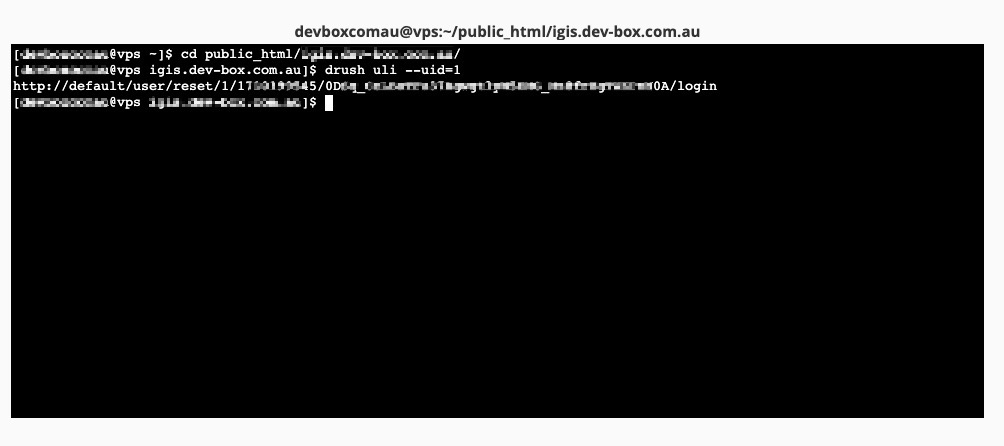
Some similar commands are:
| |
Using One-Time Login
Once you’ve got the login url from the terminal, for instance:
| |
You will need to copy the bit after the default/ starting with /user , and paste them after the base url of your drupal website (or in another word, replace default with the base-url of your website), for instance:
| |
Then you should be prompted to have succssfully logged in with the corresponding user.
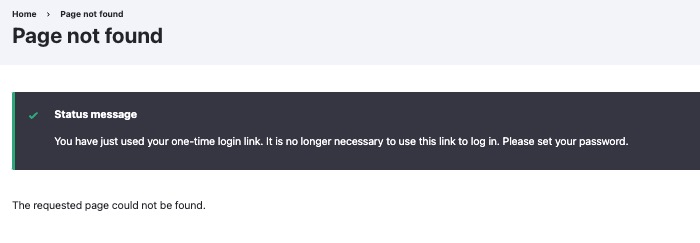
(Note: the one-time login have to be performed within 60 seconds, it cannot be reused overtime, you will be seeing something like: “Error message: You have tried to use a one-time login link that has expired. Please request a new one using the form below” when the login expires.)
Replace “default” with actual domain
If you wish to replace the default with your actual website domain, such you get an url you can directly copy and paste to login, you’ll need to declare the environmental variable DRUSH_OPTIONS_URI, for instance, if my website is www.example.com.au, I need to run:
| |
To avoid needing to run the export command every time to assign environmental variable manually, I prefer to append the following to my server’s ~/.bashrc file (or other ~/.*rc file depending on which shell in use):
| |