Introduction
Using a dedicated settings form to control the configurations for a Drupal custom module centralizes and simplifies configuration. Comparing to hard-written configuration/variable that can only changed by modifying code, this approach is more maintainable, it allows the administrator to make run-time teaks on the website through a consistent, user-friendly UI.
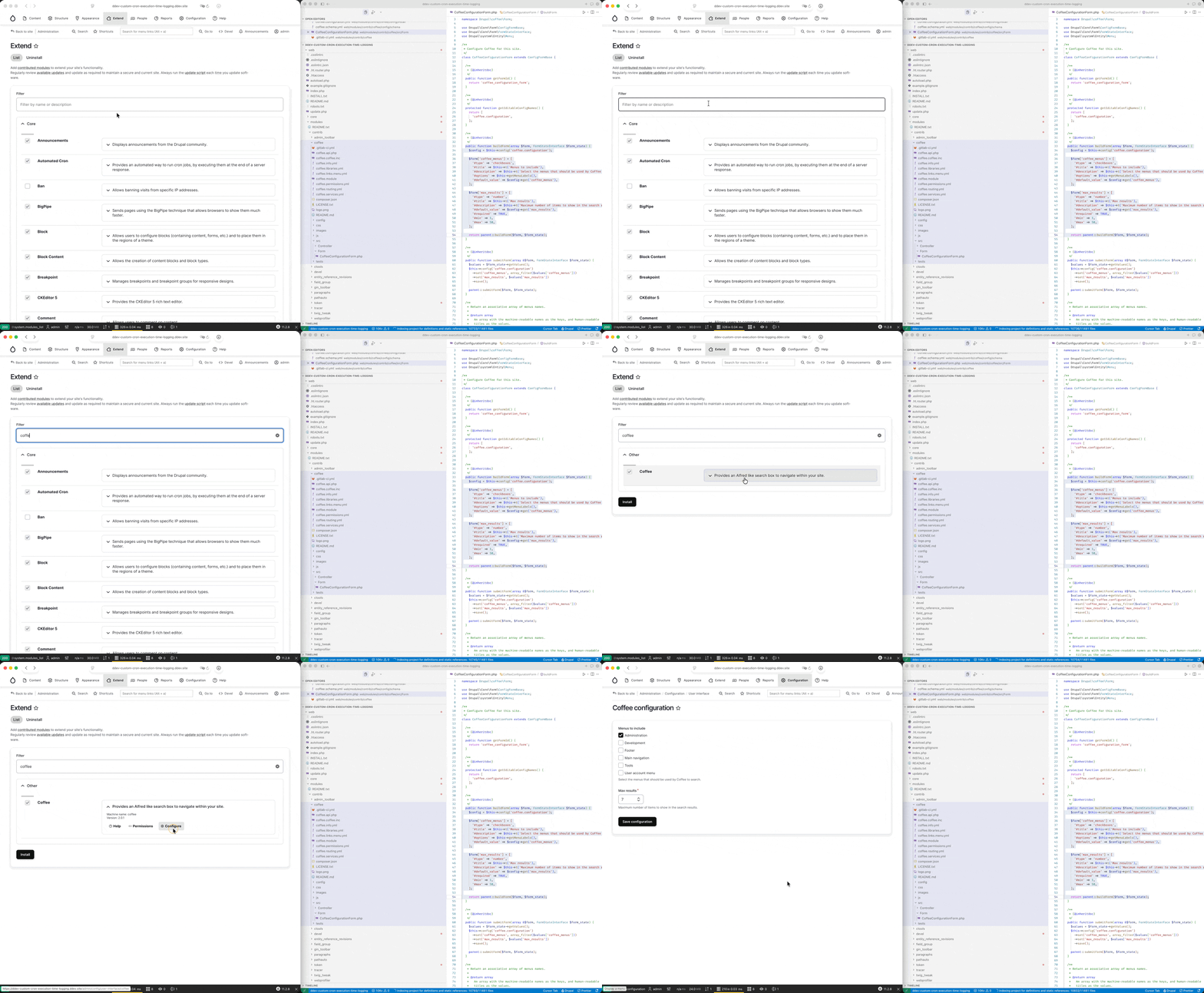
Below is an example of the “configuration + settings form page” provided by “drupal/coffee” module:
Configuration API
To begin with, custom module may have configuration but without having a corresponding settings form, to do that you’ll need to create a config folder to contain the following files (refer to this post for more details):
{module_name}/config/schema/{module_name}.schema.ymlto contain the schema information for the configurations
{module_name}/config/install/{module_name}.configuration.ymlto contain the default configuration settings (available directly after installing the module)
With the addition of the above files in your module, once you install it, you’ll be able to access the configuration variables through: \Drupal::config('{module_name}.configuration'); .
Example -1: Drupal/Coffee Module
For example, the drupal/coffee module have the following files to provide configuration schema and defaults:
coffee/config/schema/coffee.schema.yml1 2 3 4 5 6 7 8 9 10 11 12 13coffee.configuration: type: config_object label: 'Coffee settings' mapping: coffee_menus: type: sequence label: 'Coffee menus' sequence: type: string label: 'Menu' max_results: type: integer label: 'Number of items to show in the search result'coffee/config/install/coffee.configuration.yml1 2 3coffee_menus: admin: admin max_results: 7
When it comes to usage, the “coffee” module access the configuration variables in the coffee.module and CoffeeController.php files
coffee/coffee.module1 2 3 4 5 6 7 8 9 10 11 12 13 14 15 16 17 18 19... /** * Implements hook_page_attachments(). */ function coffee_page_attachments(array &$attachments) { if (\Drupal::currentUser()->hasPermission('access coffee')) { + $config = \Drupal::config('coffee.configuration'); $cache_tags = isset($attachments['#cache']['tags']) ? $attachments['#cache']['tags'] : []; $attachments['#cache']['tags'] = Cache::mergeTags($cache_tags, $config->getCacheTags()); $data_path = Url::fromRoute('coffee.get_data', [], ['language' => Drupal::languageManager()->getCurrentLanguage()])->toString(); $attachments['#attached']['library'][] = 'coffee/drupal.coffee'; $attachments['#attached']['drupalSettings']['coffee'] = [ 'dataPath' => $data_path, + 'maxResults' => $config->get('max_results'), ]; } } ...CoffeeController.php1 2 3 4 5 6 7 8 9 10 11 12 13 14 15 16 17 18 19/** * Outputs the data that is used for the Coffee autocompletion in JSON. * * @return \Symfony\Component\HttpFoundation\JsonResponse * The json response. */ public function coffeeData() { $output = []; + foreach ($this->config->get('coffee_menus') as $menu_name) { $tree = $this->getMenuTreeElements($menu_name); $commands_group = $menu_name == 'account' ? ':user' : NULL; foreach ($tree as $tree_element) { $link = $tree_element->link; try { $output[$link->getRouteName()] = [ 'value' => $link->getUrlObject() ->setUrlGenerator($this->urlGenerator) ->toString(), ...
Example-2: Cron Execution Time Logging (without Settings Form)
This demonstrative purpose custom module can be found at: [Archive.zip](cron_execution_time_logging (without Form Settings).zip).
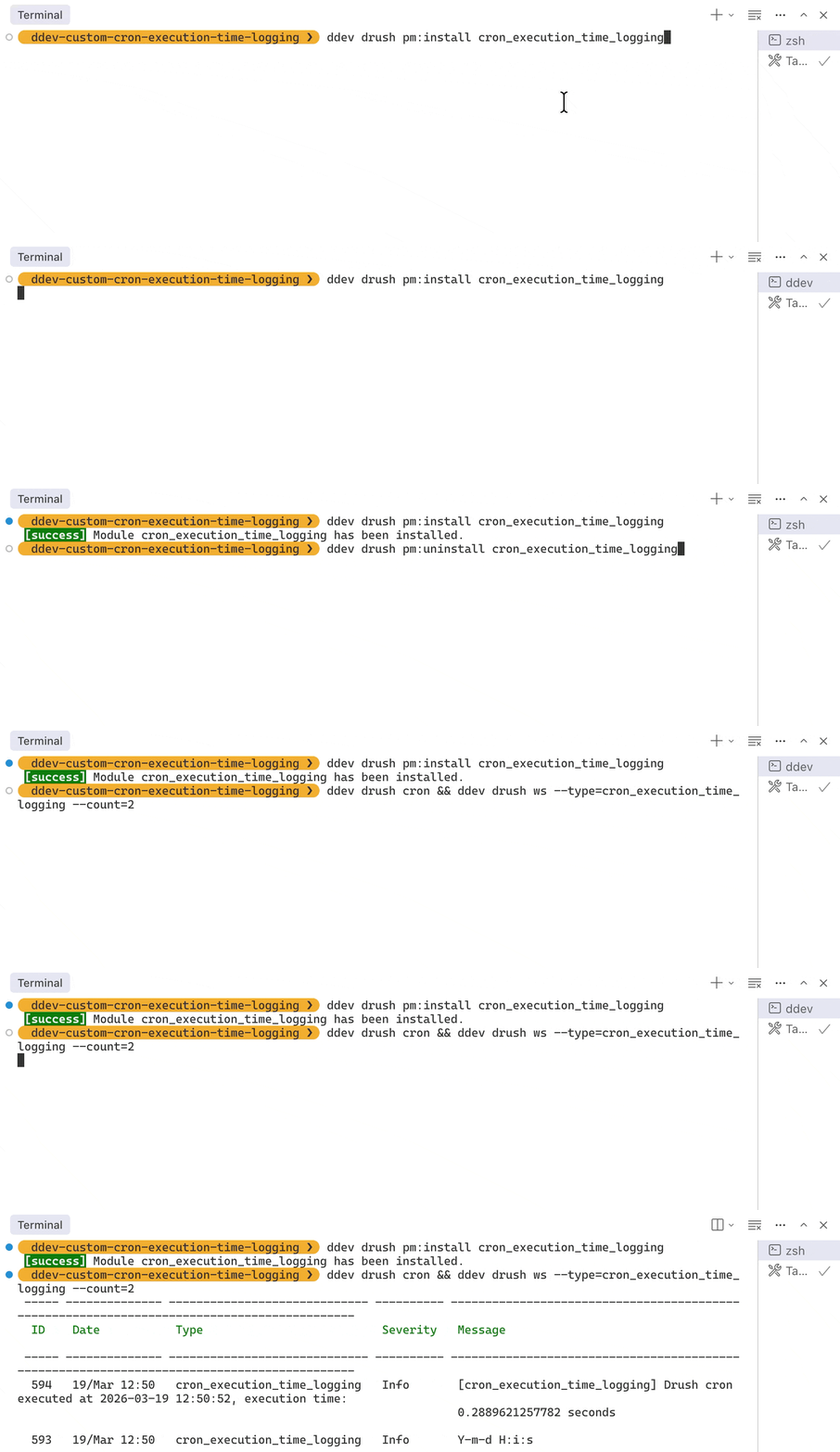
When running cron job, it will read the date_time_format configuration from the Configuration API, and print out the current time using that format.
Relevant files for Configuration API:
cron_execution_time_logging/config/schema/cron_execution_time_logging.schema.yml1 2 3 4 5 6 7cron_execution_time_logging.configuration: type: config_object label: 'Cron Execution Time Logging settings' mapping: date_time_format: type: string label: 'Cron date_time format'cron_execution_time_logging/config/install/cron_execution_time_logging.configuration.yml1date_time_format: 'Y-m-d H:i:s'cron_execution_time_logging/cron_execution_time_logging.module(what consumes the configuration)1 2 3 4 5 6 7 8 9 10 11 12 13 14<?php /** * Implements hook_cron(). * Logs the execution time of cron jobs. */ function cron_execution_time_logging_cron() { $loggerFactory = \Drupal::service('logger.factory'); + $config = \Drupal::config('cron_execution_time_logging.configuration'); + $format = $config->get('date_time_format'); $loggerFactory ->get('cron_execution_time_logging') ->info($format); ...
Final Outcome:
Export Configuration
(Export configuration to use as default) if you wish to export some existing configuration to use in module_name/config/install/module_name.configuration.yml as the default configuration, you can do that by proceeding to “Administration / Configuration / Development / Synchronize / Single Export” (/admin/config/development/configuration/single/export) :
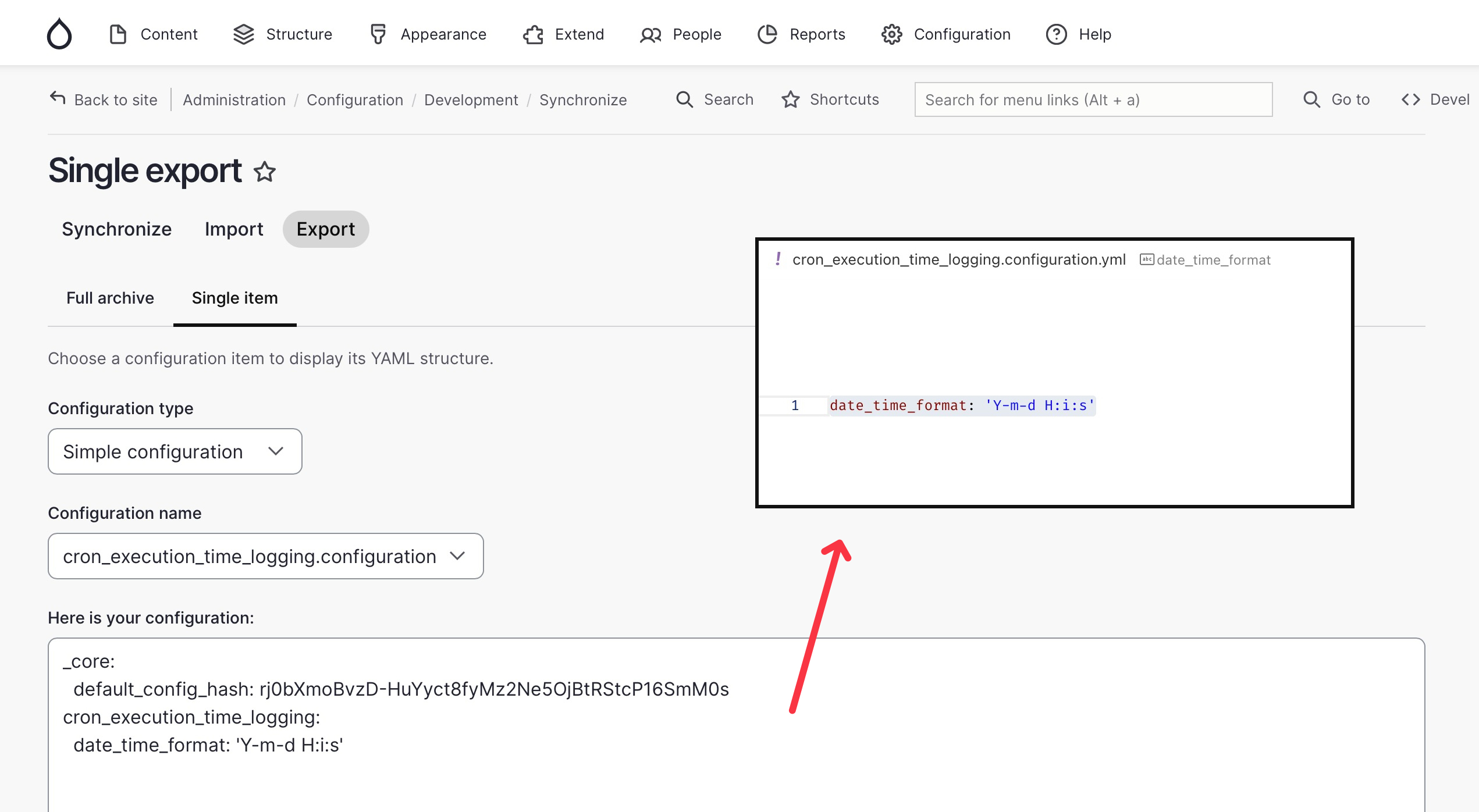
(please remove the _core: default_config_hash bits before you pasting it)
Configuration with Setting Form / Page
As suggested earlier, having a settings page for the configurations such that the administrator can change is handy. To enable this feature, you’ll need to:
- Settings Form: first create a form at
src/Form/SettingsForm.php(can be other filename), this form declares the render array inbuildForm()for the form settings (radio, checkbox, input fields), and handle form submission action insubmitForm()to save user’s input to configuration via$this->config('cron_execution_time_logging.settings') ->set('date_time_format', $form_state->getValue('date_time_format')) ->save(); - provide a router towards the settings form in
module_name.routeing.yml(make the settings form created in last step accessible by certain route) - then finally declare the router as the setting page for the module in
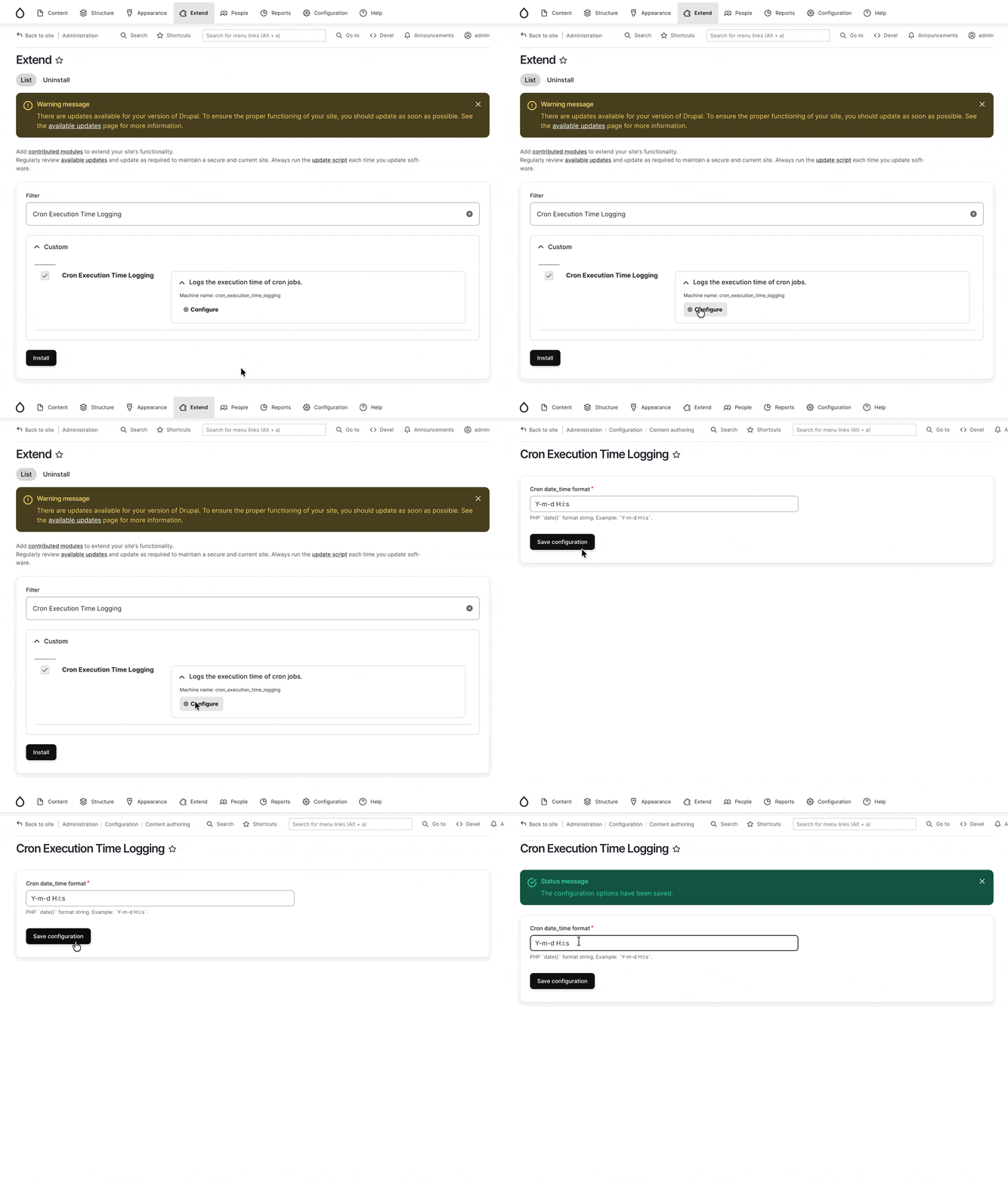
module_name.info.yml(such that you can access the configuration via clicking on the gear icon on the extension page)
Example with Settings Form
I’ll use the cron_execution_time_logging custom module we had earlier as an example:
cron_execution_time_logging/src/Form/SettingsForm.php1 2 3 4 5 6 7 8 9 10 11 12 13 14 15 16 17 18 19 20 21 22 23 24 25 26 27 28 29 30 31 32 33 34 35 36 37 38 39 40 41 42 43 44 45 46 47 48 49 50 51 52 53 54 55<?php namespace Drupal\cron_execution_time_logging\Form; use Drupal\Core\Form\ConfigFormBase; use Drupal\Core\Form\FormStateInterface; /** * Configuration form for Webform Email Cleanup webform selection. */ class SettingsForm extends ConfigFormBase { /** * {@inheritdoc} */ protected function getEditableConfigNames() { return ['cron_execution_time_logging.settings']; } /** * {@inheritdoc} */ public function getFormId() { return 'cron_execution_time_logging_settings_form'; } /** * {@inheritdoc} */ public function buildForm(array $form, FormStateInterface $form_state) { $config = $this->config('cron_execution_time_logging.settings'); $date_time_format = $config->get('date_time_format') ?: 'Y-m-d H:i:s'; $form['date_time_format'] = [ '#type' => 'textfield', '#title' => $this->t('Cron date_time format'), '#description' => $this->t("PHP `date()` format string. Example: `Y-m-d H:i:s`."), '#default_value' => $date_time_format, '#required' => TRUE, ]; return parent::buildForm($form, $form_state); } /** * {@inheritdoc} */ public function submitForm(array &$form, FormStateInterface $form_state) { $this->config('cron_execution_time_logging.settings') ->set('date_time_format', $form_state->getValue('date_time_format')) ->save(); parent::submitForm($form, $form_state); } }cron_execution_time_logging/cron_execution_time_logging.routing.yml1 2 3 4 5 6 7cron_execution_time_logging.settings: path: '/admin/config/content/cron-execution-time-logging' defaults: _form: \Drupal\cron_execution_time_logging\Form\SettingsForm _title: 'Cron Execution Time Logging' requirements: _permission: 'administer webform'cron_execution_time_logging/cron_execution_time_logging.info.yml(if you don’t create this file, the configuration form will still function, its just the little gear icon won’t appear in the “Extend” page, the administrator will have to know the URL in order to get to it)1 2 3 4 5 6name: Cron Execution Time Logging description: 'Logs the execution time of cron jobs.' package: Custom + configure: cron_execution_time_logging.settings type: module core_version_requirement: ^10 || ^11Source Code:
The complete custom module can be found at: [Archive-1.zip](cron_execution_time_logging (with Form Settings).zip)
Final Outcome:
Reference
Official Documentation
- Durpal Documentation: Develop > Creating Modules > Defining and using your own configuration in Drupal
- Durpal Documentation: Develop > Creating Modules > Include default configuration in your Drupal module
- Drupal Documentation: Develop > Creating modules > Settings Form
Extension Reading
Drupal Documentation: Develop > Drupal API > Configuration API
Drupalize.Me: Create a Settings Form in a Module (Drupal 9,10,11)
(↑ *I have no membership in drupalize.me, so I can’t see this tutorial,
but if you do, I believe this will be a good resource to read)