On the feature page of the Vite’s Documentation, on the upper-most section, titled: “npm Dependency Resolving and Pre-Bundling”, it says:
Native ES imports do not support bare module imports like the following:
1import { someMethod } from 'my-dep'The above import will throw an error in the browser. Vite will detect such bare module imports in all served source files and perform the following:
- Pre-bundle them to improve page loading speed and convert CommonJS / UMD modules to ESM. The pre-bundling step is performed with esbuild and makes Vite’s cold start time significantly faster than any JavaScript-based bundler.
- Rewrite the imports to valid URLs like
/node_modules/.vite/deps/my-dep.js?v=f3sf2ebdso that the browser can import them properly.
There are many terminologies mentioned here: “Native ES import”, “CommonJS/UMD/ESM modules”, “pre-bundling”, without understanding towards these, I don’t think I can justify the above paragraph, so in this post I’ll delve into the details about these concepts and why one may need Vite for the next project.
JavaScript Module System
Because early JavaScript was designed in a rush for simple, inline browser scripting where each page just loaded a few scripts in global scope. There wasn’t the need of a formal module system to manage the packaging or dependency.
A proper module system only emerged after the ecosystem’s needs outgrew global scripts. People starting to see the benefit of dividing a global bulk JavaScript into smaller modules, some of the benefits are:
- Encapsulation: keeps implementation details private, only expose via API;
- Reusability: functions can be reused across projects/features without duplication;
- Maintainability: smaller, focused files with separation of concern are easier to understand, test, and refactor.
However, due to different environments, constraints and timeline, multiple solutions are developed in parallel during the early days. For instance, browser need asynchronous fetching and execution, leading to AMD solution; But the same async features aren’t so important on servers (such as Node), instead what servers need is fast local file system.
Thought the history of module system, there’re four mainstream standard:
- CommonJS (CJS)
- AMD (Asynchronous Module Definition)
- UMD (Universal Module Definition)
- ESM (ECMAScript Modules)
CommonJS vs AMD vs UMD vs ESM
(*ALL content below are referenced from this post from shivarajbakale.com)
CommonJS (CJS)
CommonJS is a module system used by Node.js server-side applicaiton. It uses the
require()function to load modules synchronously. CJS modules export an object, and any exported value becomes part of that object. For example, the following code exports and imports a function:
1
2
3
4
5
6
// [hello.js] function hello() { console.log('Hello, world!'); } module.exports = hello; // [app.js] const hello = require('./hello') hello();
Asynchronous Module Definition (AMD)
AMD is a module system designed for the browser. It uses the
define()function to define modules, and it loads modules asynchronously. AMD modules export an object, and any exported value becomes part of that object. For example, the following code exports and imports a function:
1
2
3
4
5
6
7
8
9
// [hello.js] define(function() { function hello() { console.log('Hello, world!');} return hello; }); // [app.js] require(['./hello'], function(hello) { hello(); });
Universal Module Definition (UMD)
UMD is a hybrid module system that supports both synchronous and asynchronous loading. It uses a combination of CommonJS and AMD syntax to provide a flexible and modular system. UMD modules export an object, and any exported value becomes part of that object. For example, the following code exports and imports a function:
 1
 2
 3
 4
 5
 6
 7
 8
 9
10
11
12
// [hello.js] (function (root, factory) { if (typeof define === 'function' && define.amd) { define([], factory); } else if (typeof module === 'object' && module.exports) { module.exports = factory(); } else { root.hello = factory(); } }(this, function () { function hello() { console.log('Hello, world!'); } return hello; })); // [app.js] const hello = require('./hello'); hello();
ECMAScript Modules (ESM)
ECMAScript Modules (ESM) are a module system built into the JavaScript language itself. They use the
importandexportkeywords to define and load modules. ESM modules are loaded asynchronously, and they are executed in strict mode. ESM modules export a value, and that value becomes part of the module’s public interface. For example, the following code exports and imports a function:
1
2
3
4
5
// [hello.js] export function hello() { console.log('Hello, world!');} // [app.js] import { hello } from './hello.js'; hello();
What’s the Issue ?
As previously mentioned each standards exists to solve different issues, as a result of this, except for ESM, not all standards are available on all platforms. For instance:
AMD is available when you include RequireJS library (or other libraries that implement the AMD API), but not available on node/browser without it.
CommonJS is available on Node.js server-side application; CommonJS is used as the default and primary module system since its inception, commonly used to import from libraries living in
node_modules. (see example: link)UMD aims to formalize the definition of universal modules. It does not provide a universal definition… (Read More at: this stack-overflow post, and this git repository)
ESM is available on all modern browsers and node server-side application:
- Node Server: use
"type":"module"in yourpackage.jsonfile to treat all.jsfile as ES modules bye default (by default thepackage.jsonhas"type":"commonjs"(see example: link) OR name the file using the.mjssuffix and import using theimport(...).then(...=>,,,)pattern (see example: link) - Browser: When you include script with
<script src="...">(class script), you load and run traditional script in the global scope; where in contrast; When you include script with<script type="module" src="...">(module script), you load ECMAScript Module withimport/exportkeyword available, and its own isolated scope. (see example: link, also here’s a comparison table between the two approach: comparison-between-classic-and-module-script)
- Node Server: use

If the wrong standard is used on the wrong environment, the runtime would fail at the import/export/require statement:
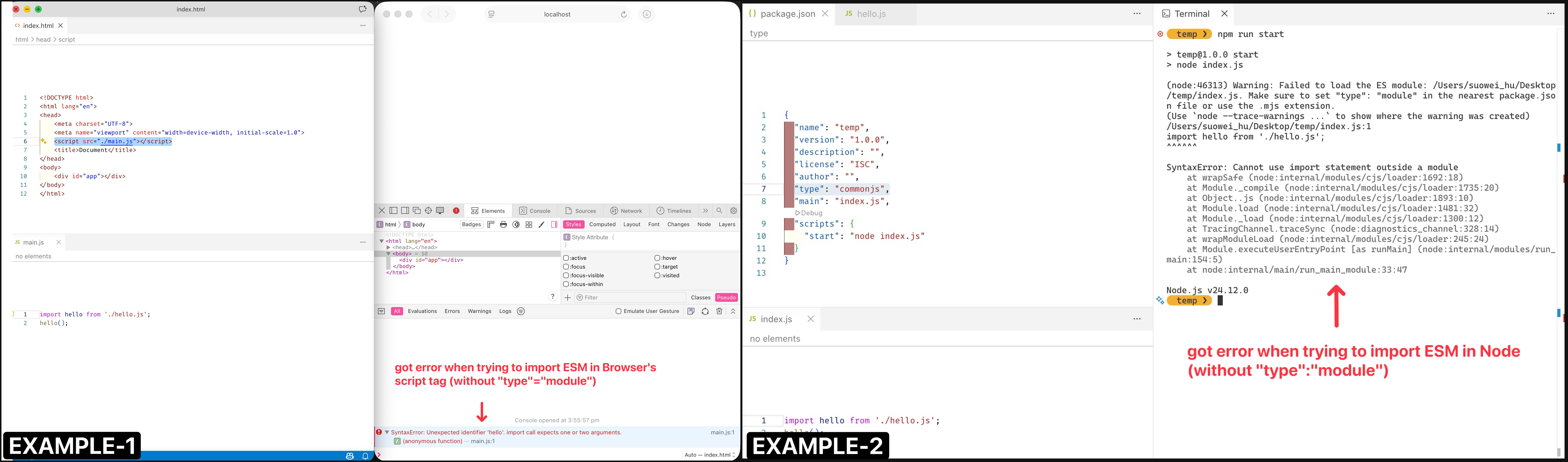
Though you might think that we can just use ESM anywhere because it is cross-platform supported, and you are correct, but not all modules available on NPM are written in ESM fashion, especially the dated ones before ESM is even introduced. Some of them will be CJS-only, some ESM-only, some UMD/AMD only, or combination of the standards or all standards.
For instance:
lodash is only available CommonJS for Node.js
eslint is only available in CommonJS for Node.js
charts.js provide a UMD/AMD version for Browser importable via RequireJS (if you include the wrong file it, it won’t work)
popper.js provide a UMD/AMD version for Browser importable via RequireJS (if you include the wrong file it, it won’t work)
….. *you can find a lot more if you ask any chatbot
What Build Tools Helps ?
The Builder Tool, Vite, comes with a pre-bundling process that will transform any CommonJS / AMD / UMD modules into ESM (EMCAScript Modules) using esbuild such that the sane ESM fashion import/export can work consistently throughout the project.
Furthermore, if you recall from earlier examples, when we import from ESM modules, we need to include the relative or absolute path to files: import './hello.js', improt './node_modules/leaflet/dist/leaflet.esm.js'; But if you have done some Vue/React tutorials, you’ll notice that when they import those libraries, they can use the “bare module name”: import {ref} from "vue", import {useEffect} from "react". This is because Vite will rewrite these bare module name import statement to the valid URL so that the browser can import them properly.
(See more at: Vite > Feature > npm Dependency Resolving and Pre-Bundling).
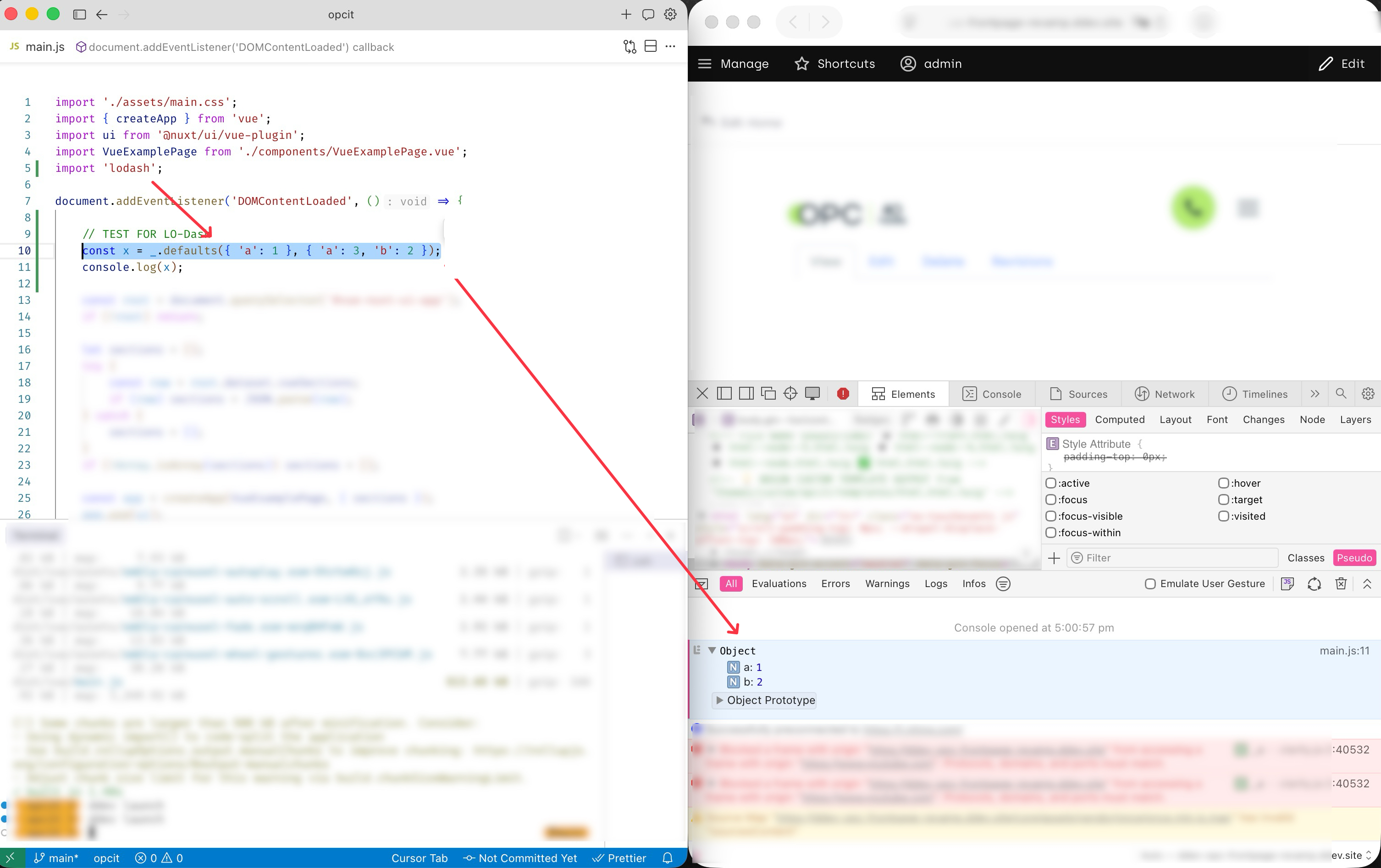
For example, below is an example of the lodash library being use by a Vue application bundled by Vite; The loadsh library is written in CommonJS so it cannot be imported into browser directly, but Vite’s power of transforming it into ESM during the pre-build process resolves this bottle-neck: