Introduction#
Drupal 11.1 introduced the new Icon API, which allows modules and themes to define icon packs. An icon pack consists of a series of icons, each with a unique identifier that the system can then use. Modules and themes can alter icon packs.
– Ref: Drupal.org > Develop > Drupal APIS > Icon API
It is highly recommended that you read the offical documentations (above) and experiment yourself, once you have a rough understanding you can continue via trying out the below example.
Example Usage#
You can find the offical examples of “Icon API” usage at:
You can also reference some of the contributed theme for usage:
Example: Hero Icon in Custom Theme#
source code of this example_theme_name theme
(with Hero Icon Pack) can be found at: Archive.zip)
To being with, we need to declare an icon pack using a *.icons.yml file:
 1
 2
 3
 4
 5
 6
 7
 8
 9
10
11
12
13
14
15
16
17
18
19
20
21
22
23
24
25
26
27
28
29
30
31
32
33
34
35
36
37
38
39
40
41
42
43
44
45
| #FILE: example_theme_name.icons.yml
heroicons_outline:
enabled: true
extractor: svg
config:
sources:
- src/icons/heroicons/outline/{icon_id}.svg
template: >-
<svg
{{ attributes
.setAttribute('xmlns', 'http://www.w3.org/2000/svg')
.setAttribute('viewBox', '0 0 24 24')
.setAttribute('width', size|default(24))
.setAttribute('height', size|default(24))
.setAttribute('class', class|default(''))
.setAttribute('fill', 'none')
.setAttribute('stroke', color|default('currentColor'))
.setAttribute('stroke-width', '1.5')
.setAttribute('stroke-linecap', 'round')
.setAttribute('stroke-linejoin', 'round')
}}
{% if alt %}
role="img"
aria-label="{{ alt }}"
{% else %}
aria-hidden="true"
{% endif %}
>
{{ content }}
</svg>
settings:
size:
type: integer
default: 24
multipleOf: 2
minimum: 16
maximum: 96
class:
type: string
color:
type: string
format: color
alt:
type: string
description: "Accessibility alternative text, leave empty for decorative icon."
|
Notice in this file, we have the following keys:
extractor key: either svg , or path, or svg_sprite (compulsory)
config > source key: sources is used to inform the extractor of path(s) or url(s) to discover the list of icons available in Drupal.
template key: provide a Twig template to render the Icon
settings key: allow to define any setting specific to the Icon Pack that will be generated as a Drupal Form when the icon is used and pass to the Twig template.
(* I’ve purged some of the optional keys from the above example to keep it clean)
(* read more about the available keys at: Icon API > YAML icon pack declaration documentation)
Next retrieve the svg icons available in hero icon from its GitHub repository: tailwindlabs/heroicons, and place them at the path you declared at config > source in the *.icons.yml file. For demonstration purpose, I used the icons located at heroicons/optimized/24/outline for the heroicons_outline icon pack, and placed them at the example_theme_name/src/icons/outline folder:
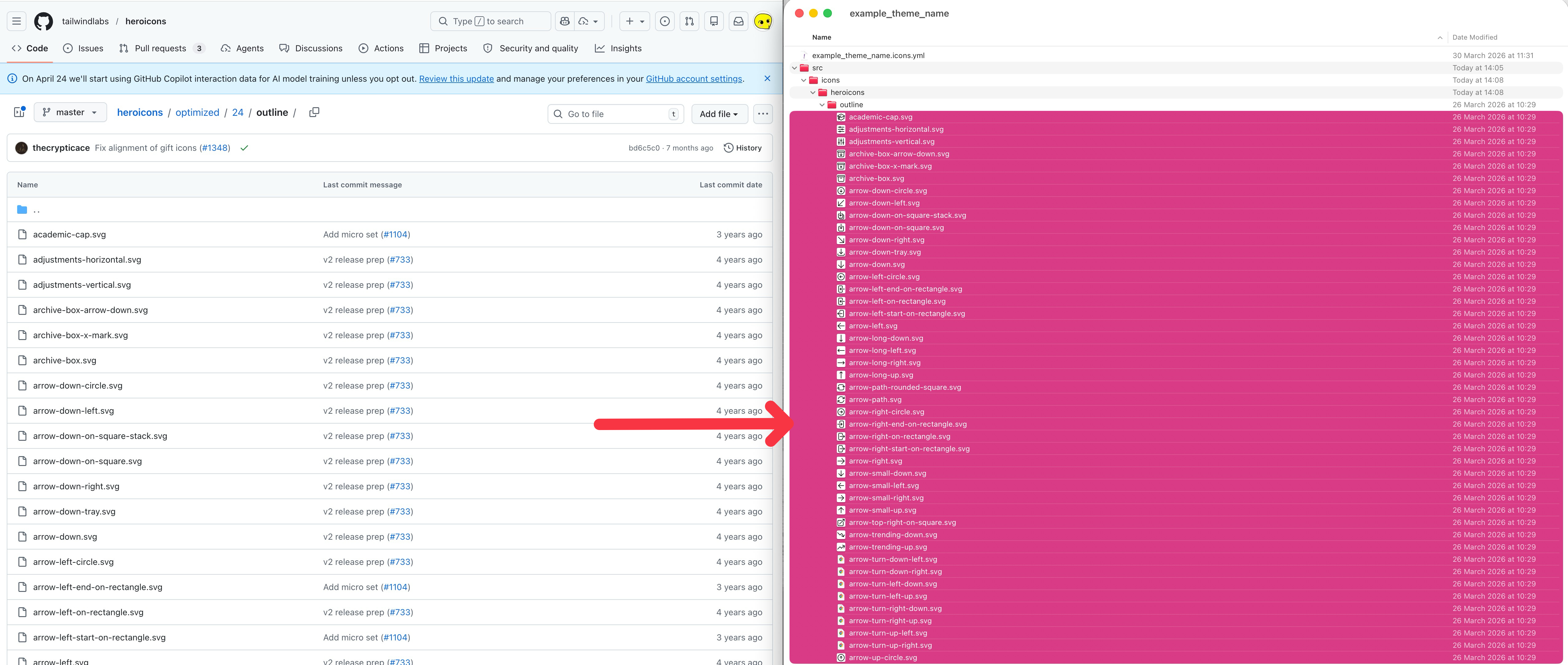
Notice that for some of the Icon Libraries, the svg files may use a “hard-written” fill or stroke color values; Hence, you might want to batch replace them using currentColor or classname + css-for-icon instead (for instance, all the svg icons inside the hero-icon’s optimised folder are using currentColor so we don’t need to worry about them, but all svg icons inside its src folder have hard-written color values that needs to be pre-processed):
 1
 2
 3
 4
 5
 6
 7
 8
 9
10
| <svg width="24" height="24" viewBox="0 0 24 24" fill="none" xmlns="http://www.w3.org/2000/svg">
<path
- stroke="black"
+ stroke="currentColor"
stroke-width="1.5"
stroke-linecap="round"
stroke-linejoin="round"
d="M4.25933 10.1466C3.98688 12.2307 3.82139 14.3483 3.76853 16.494C6.66451 17.703 9.41893 19.1835 12 20.9036C14.5811 19.1835 17.3355 17.703 20.2315 16.494C20.1786 14.3484 20.0131 12.2307 19.7407 10.1467M4.25933 10.1466C3.38362 9.8523 2.49729 9.58107 1.60107 9.3337C4.84646 7.05887 8.32741 5.0972 12 3.49255C15.6727 5.0972 19.1536 7.05888 22.399 9.33371C21.5028 9.58109 20.6164 9.85233 19.7407 10.1467M4.25933 10.1466C6.94656 11.0499 9.5338 12.1709 12.0001 13.4886C14.4663 12.1709 17.0535 11.0499 19.7407 10.1467M6.75 15C7.16421 15 7.5 14.6642 7.5 14.25C7.5 13.8358 7.16421 13.5 6.75 13.5C6.33579 13.5 6 13.8358 6 14.25C6 14.6642 6.33579 15 6.75 15ZM6.75 15V11.3245C8.44147 10.2735 10.1936 9.31094 12 8.44329M4.99264 19.9926C6.16421 18.8211 6.75 17.2855 6.75 15.75V14.25"
/>
</svg>
|
 1
 2
 3
 4
 5
 6
 7
 8
 9
10
11
12
13
14
15
16
17
| <svg width="24" height="24" viewBox="0 0 24 24" fill="none" xmlns="http://www.w3.org/2000/svg">
<path
- fill="#0F172A"
+ fill="currentColor"
d="M11.6998 2.80529C11.8912 2.72164 12.1089 2.72164 12.3003 2.80529C16.0192 4.43011 19.5437 6.41637 22.8295 8.71956C23.0673 8.88623 23.1875 9.1752 23.1381 9.46135C23.0887 9.7475 22.8785 9.97941 22.5986 10.0567C21.9137 10.2457 21.2347 10.4494 20.5618 10.6663C17.8307 11.5471 15.2018 12.6554 12.6972 13.9688L12.6939 13.9705C12.5803 14.0301 12.467 14.09 12.354 14.1504C12.1331 14.2684 11.8679 14.2684 11.6471 14.1504C11.533 14.0895 11.4186 14.0289 11.3039 13.9688C10.0655 13.3193 8.79658 12.7201 7.5 12.1736V11.95C7.5 11.8186 7.56742 11.702 7.67173 11.6389C9.17685 10.727 10.7294 9.88565 12.3247 9.11936C12.6981 8.94002 12.8554 8.49195 12.6761 8.11858C12.4967 7.7452 12.0486 7.58791 11.6753 7.76725C10.036 8.55463 8.44086 9.41909 6.89449 10.3559C6.44111 10.6306 6.13632 11.0801 6.03607 11.5838C5.18115 11.2549 4.31499 10.9486 3.43829 10.6659C2.76546 10.4489 2.08644 10.2457 1.40154 10.0567C1.12162 9.9794 0.911461 9.74749 0.86204 9.46134C0.812619 9.17519 0.932824 8.88622 1.17061 8.71955C4.45645 6.41636 7.98097 4.43011 11.6998 2.80529Z"
/>
<path
- fill="#0F172A"
+ fill="currentColor"
d="M13.0609 15.4734C15.4997 14.1703 18.0621 13.0687 20.7258 12.1906C20.8601 13.6054 20.9458 15.0343 20.9813 16.4755C20.9889 16.7847 20.8059 17.0669 20.5205 17.1861C17.6693 18.3764 14.9574 19.834 12.4159 21.5277C12.1641 21.6955 11.836 21.6955 11.5841 21.5277C9.04267 19.834 6.33073 18.3764 3.4796 17.1861C3.19416 17.0669 3.01116 16.7847 3.01878 16.4755C3.05429 15.0342 3.14001 13.6052 3.27427 12.1903C4.19527 12.4938 5.10415 12.8242 6 13.1803V14.4507C5.55165 14.71 5.25 15.1948 5.25 15.75C5.25 16.2453 5.49008 16.6846 5.86022 16.9577C5.7707 17.3383 5.63822 17.7108 5.46277 18.0675C5.91546 18.2811 6.36428 18.5017 6.8091 18.7289C7.06243 18.2137 7.24612 17.6729 7.36014 17.1207C7.88449 16.887 8.25 16.3612 8.25 15.75C8.25 15.1948 7.94835 14.71 7.5 14.4507V13.8059C8.6714 14.3177 9.81885 14.8743 10.9402 15.4734C11.6028 15.8274 12.3983 15.8274 13.0609 15.4734Z"
/>
<path
- fill="#0F172A"
+ fill="currentColor"
d="M4.46222 19.4623C4.88136 19.0432 5.21502 18.5711 5.46277 18.0675C5.91546 18.2811 6.36428 18.5017 6.8091 18.7289C6.49055 19.3768 6.06164 19.9842 5.52288 20.523C5.22999 20.8158 4.75512 20.8158 4.46222 20.523C4.16933 20.2301 4.16933 19.7552 4.46222 19.4623Z"
/>
</svg>
|
Finally when it comes to using the icons declared in our icon pack, most people will use it in Twig template like the follows (if you happen to need to use them in PHP (render array), you can refer to this section of the official guide: https://www.drupal.org/docs/develop/drupal-apis/icon-api#s-render-an-icon-with-php)
 1
 2
 3
 4
 5
 6
 7
 8
 9
10
11
12
13
14
15
| {{
icon(
'material_symbols', <--- The icon pack's name declared
'home', <--- The icon's name (matches the corresponding svg
filename inside src/icon/heroicon/outline folder)
{ <--- The settings for the icon
size: 64, (varies & dependent on your setup)
color: "black"
class: "border-2 border-black p-2 rounded-full"
alt: "home icon"
}
)
}}
|
Here’s more example of the usage
1
2
3
| {{ icon('material_symbols','home-modern')}}
{{ icon('material_symbols', 'device-phonemobile', {size: 64}) }}
{{ icon('material_symbols', 'chat-bubblebottom-center', {size:64, color:"green"}) }}
|
Reference#