Event Listener / Dispatcher#
The addEventListener() method must have been familiar to you if you’ve worked with JavaScript, for instance:
1
2
3
| document.addEventListener("DOMContentLoaded", (event) => {
...
}); //Do something when the document finishes loading
|
1
2
3
4
5
| const element_button = document.getElementById("example-button");
element_button.addEventListener("click", (event) => {
alert("Example Button Pressed");
...
}); //Show alert message when the button is pressed
|
You can find a full list of the DOM events in the below links:
Below are some of the most commonly used event:
- Mouse related:
clicked, dbclick, contextmenu, mouseenter/mouseleave - Keyboard related:
keydown, keyup, keypress - Form related:
submit, change, input, focus/blur - Window related:
DOMContentLoaded, load, resize, scroll
But also note that you can also declare custom event using the new Event() constructor, dispatch it using the dispatchEvent() function, and capture it using the addEventListener(), for instance:
 1
 2
 3
 4
 5
 6
 7
 8
 9
10
11
12
13
14
15
16
| <button id="example-button" onclick="handleClick()">Click me</button>
<script>
const btn_element = document.getElementById('example-button')
// Dispatch a custom event when the button is clicked
function handleClick() {
btn_element.dispatchEvent(new CustomEvent('customEvent', { detail: 'Hello, World!' }));
}
// Listen for the custom event
btn_element.addEventListener(
'customEvent',
(event) => {
const detail = String(event.detail);
console.log('Custom event received:', detail);
}
);
</script>
|

You can find the example source code here: Archive.zip
Event Bubbling#
If you wish the event to bubble up from its “source element”, such that you can capture it anywhere in-between, you may set attribute for Event being {bubbles: true}:
 1
 2
 3
 4
 5
 6
 7
 8
 9
10
| <!-- FILE: index.html -->
<div id="example-listener-element">
<div>
...
<div id="example-dispatcher-element"> HELLO WORLD </div>
...
</div>
</div>
<script src="js_eventLisener_document.js"></script>
<script src="js_eventDispatcher_exampleElement.js"></script>
|
1
2
3
4
5
6
7
8
9
| // FILE: js_eventLisener_document.js
const listener_element = document.getElementById("example-listener-element");
listener_element.addEventListener(
"hello-event",
function (event) { // <-- catch the event
alert("Hello \n from \t" + event.target.tagName + "#" + event.target.id + "\n at \t\t" + this.tagName + "#" + this.id);
console.log(event);
}
);
|
1
2
3
4
5
| // FILE: js_eventDispatcher_exampleElement.js
const dispatcher_element = document.getElementById("example-dispatcher-element");
dispatcher_element.dispatchEvent(
new Event("hello-event", {bubbles: true})
);
|
Final Outcome:

You can find the example source code here: Archive.zip
Example Usage#
For example I have a JavaScript library “js-cookie” I want to include in the project, and I want certain script to only run after it is attached, then I can use the following:
1
2
3
4
| // FILE: js-cookie-library.js
import Cookies from "js-cookie";
window.Cookies = Cookies;
document.dispatchEvent(new Event("JsCookiesLoaded", { bubbles: true }));
|
 1
 2
 3
 4
 5
 6
 7
 8
 9
10
11
12
13
14
15
16
17
18
19
20
21
22
23
24
| // FILE: component/banner/banner.js
document.addEventListener("JsCookiesLoaded", () => { // <--- listen for the JsCookiesLoaded event (when the js-cookie library is loaded)
consolg.log("JS-Cookie library is loaded !");
// ... do something start ...
// ------------------------------------------------------------------------------
// iterate over all the banners that have a dismissable button
document.querySelectorAll("div.sdc-banner:has(button[data-dismiss-banner-id])").forEach((element) => {
const bannerElement = element;
const dismissibleId = element.querySelector("button[data-dismiss-banner-id]").getAttribute("data-dismiss-banner-id");
const dismissableButton = element.querySelector("button[data-dismiss-banner-id]");
const cookieName = `banner_dismissed_${dismissibleId}`;
// set the cookie when the dismissable button in banner is clicked
dismissableButton.addEventListener("click", () => {
window.Cookies.set(cookieName, "true", { expires: 7 }); // the cookie will expire in 7 days
bannerElement.remove();
});
// check if the cookie is set and if it is, remove the banner
if (window.Cookies.get(cookieName)) {
bannerElement.remove();
}
});
// ------------------------------------------------------------------------------
// ... do something end ...
}
|
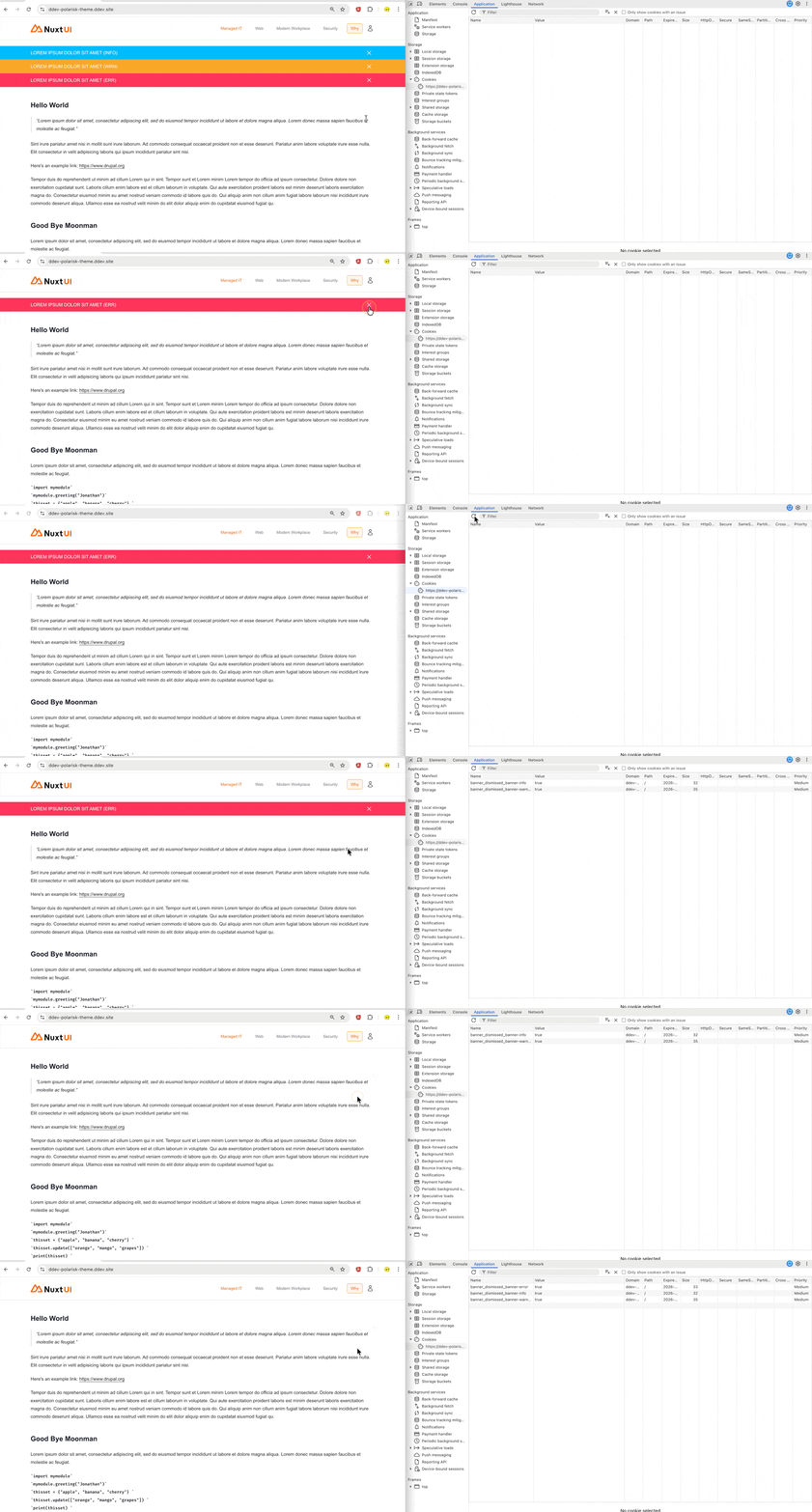
Reference#
JavaScript.Info – Dispatching custom events: link
MDN – EventTarget: addEventListener() method: link
MDN – EventTarget: dispatchEvent() method: link
MDN – DOM Events: link