Incentive ?
Traditionally, I use Git Hook to verify code’s format and linting issues; For instance, I create the .git/hooks/pre-commit in your project, you can run npm run format:check script (which contains Prettier/ESLint related checking), and only allow a user to commit the exit code of the script is 0 (that is if the script succeed):
| |
| |
The issue with this is that:
- all the git hook is stored locally inside the
.gitdirectory which is automatically ignored by git; Hence you cannot share it with your team and have them to use the same format linting check before committing. - when running the
format:checkcommand, it checks all the files in your directory, which can take very long; sometimes you may want to only check the stages files that you are about to commit.
To solve this issue we can use Husky + Lint-Staged: Husky enables to to write git hook and share it with people, lint-staged allow you to run formatter linter check (and write) on the staged file only.
Step-by-Step ?
Step-1: install husky
| |
(*the init command will generate the .husky directory with a pre-populated example hook running npm test, of which you can safely delete via rm .husky/pre-commit)
Step-2: install lint-staged
Install lint-staged package as a development dependency
| |
Step-3: configure lint-staged
Populate the following lint-staged configuration into your package.json (there are other ways to populate your lint-stage configuration, for instance lint-staged.config.js, see: https://github.com/lint-staged/lint-staged/tree/main#configuration)
| |
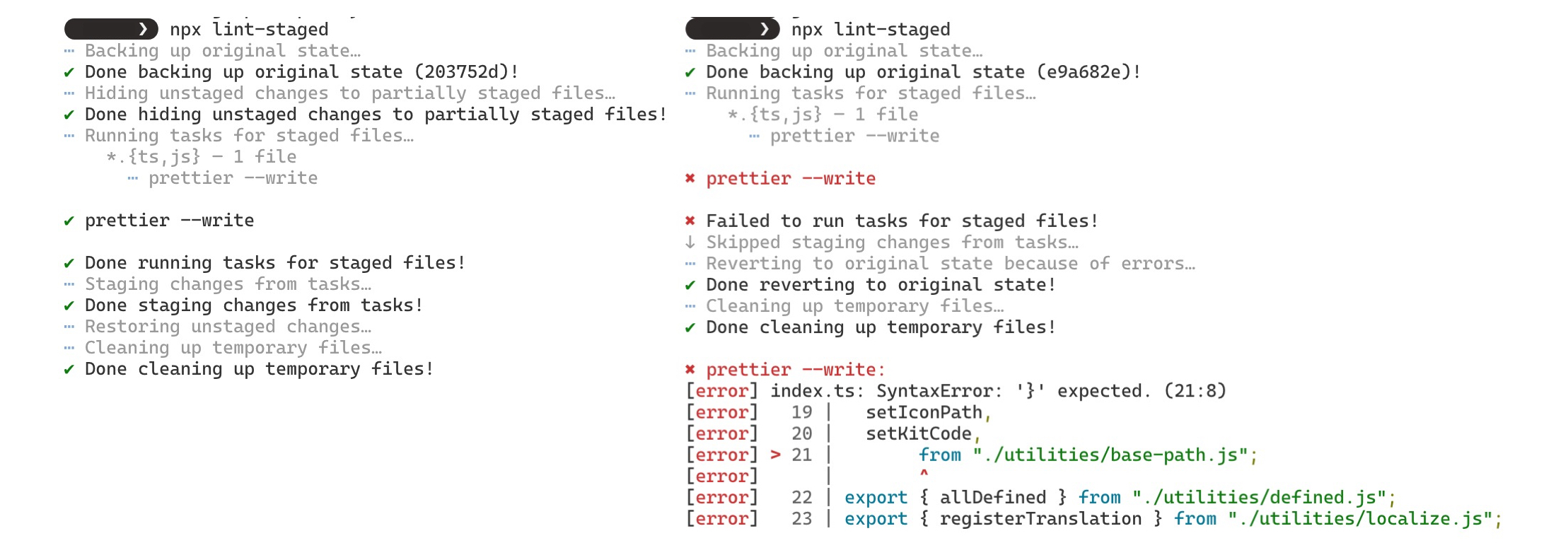
Note that, you will have to install the dependencies you’ve used in lint-staged command for instance, npm i prettier / npm i cspell / npm i prettier / npm i eslint. After that you can run lint-staged command using npx:
Step-4: setup git hook (pre-commit)
Then let’s use husky to trigger lint-staged using git hook whenever a git commit command is being run:
| |
Step-5: trial perform commit
Finally let’s trial making a commit, and check if the git hook gets trigged by husky to use lint-staged to run formatter/linter for the staged files:
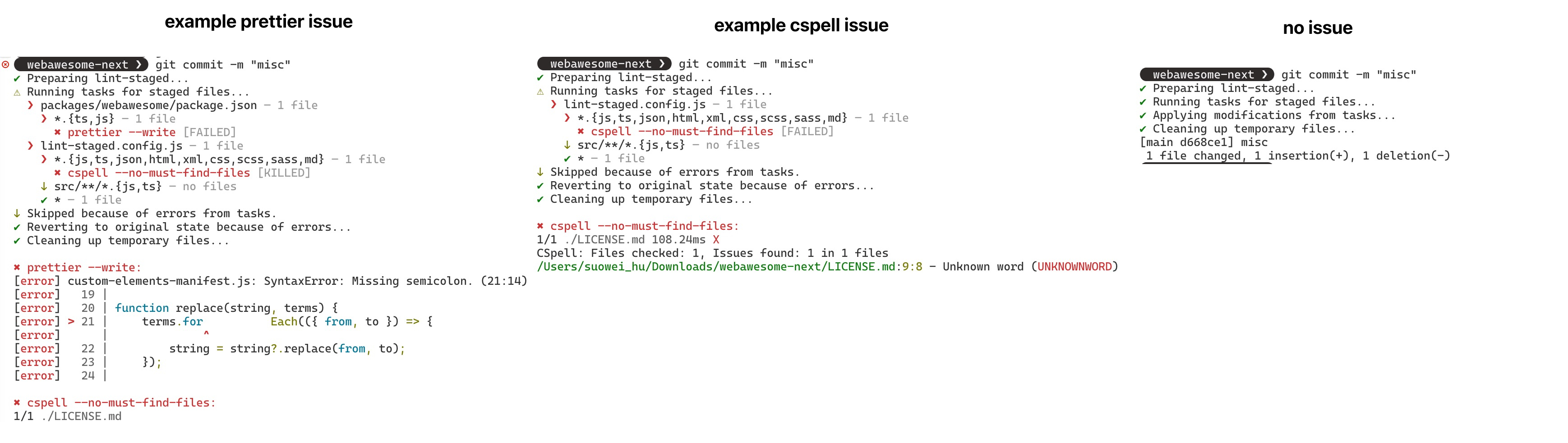
(*Note that, by default, lint-staged creates a backup before running formatting or linting tasks. If a task fails, it can restore the state that existed before execution.)
Reference
- Lint-Staged: Run tasks like formatters and linters against staged git files and don’t let 💩 slip into your code base!
- Husky: Modern native Git hooks made easy
- Landing: https://typicode.github.io/husky/
- GitHub: https://github.com/typicode/husky
- Medium - Noelia Lopez - Lint stage files and say bye to 💩 code!
- Dev.To - markzzw - Pre-commit with husky & lint-staged
- GitHub - Web Awesome - webawesome / .husky / pre-commit (
npx --no-install lint-staged)