Static Build Storybook#
If want to just build the Storybook into a static web application, you can server it through DDEV via the following steps:
(⚠️ the draw back of this approach is obvious, that every time you made some change in your component or stories, you will need to rebuild the static files to preview the latest changes, hence personally I would recommend you to skip this approach altogether and just look at the next one to save your time ! )
STEP-1: Build the storybook via running npm run build-storybook, after the build is a success you should have a directory located in the root of your storybook project named stroybook-static; And inside this directory you should have the following files, with index.html being the entry-point we’ll configure the the next steps:
 1
 2
 3
 4
 5
 6
 7
 8
 9
10
11
12
13
14
| [storybook-static/]
│
├── addon-visual-tests-assets/
├── sb-addons/
├── sb-common-assets/
├── sb-manager/
│
├── assets/
│
├── project.json
├── index.json
│
├── iframe.html
└── index.html
|
STEP-2: Save your local Node’s version to .nvmrc, and configure DDEV (this way DDEV will automatically pick up the Node’s version):
 1
 2
 3
 4
 5
 6
 7
 8
 9
10
11
12
13
| > node -v > .nvmrc
> cat .nvmrc
v24.12.0
> ddev config --nodejs-version="auto" --nodejs-root="." --docroot="storybook-static" --project-name="ddev-example-storybook"
Creating a new DDEV project config in the current directory (.../example-storybook-root)
Once completed, your configuration will be written to .../example-storybook-root/.ddev/config.yaml
Configuring a 'php' project named 'ddev-storybook-example' with docroot 'storybook-static' at '.../example-storybook-root/storybook-static'.
For full details use 'ddev describe'.
Configuration complete. You may now run 'ddev start'.
|
OR, alternatively if you do not want to generate a .nvmrc, you can manually the node version in DDEV as well:
1
2
3
4
5
6
7
| > ddev config --nodejs-version="24" --nodejs-root="." --docroot="storybook-static" --project-name="ddev-example-storybook
Creating a new DDEV project config in the current directory (.../example-storybook-root)
Once completed, your configuration will be written to .../example-storybook-root/.ddev/config.yaml
Configuring a 'php' project named 'ddev-storybook-example' with docroot 'storybook-static' at '.../example-storybook-root/storybook-static'.
For full details use 'ddev describe'.
Configuration complete. You may now run 'ddev start'.
|
STEP-3: Finally run ddev launch, DDEV will automatically trigger ddev start if your project container are not running, and open your browser, and you’ll see your statically built Storybook:
 1
 2
 3
 4
 5
 6
 7
 8
 9
10
11
12
13
14
15
16
17
18
| > ddev launch
Project ddev-storybook-example is not running, starting it
Starting ddev-storybook-example...
Building project images.................
Project images built in 15s.
[+] up 3/3
✔ Network ddev-ddev-storybook-example_default Created 0.0s
✔ Container ddev-ddev-storybook-example-web Created 0.0s
✔ Container ddev-ddev-storybook-example-db Created 0.1s
You have Mutagen enabled and your 'php' project type doesn't have `upload_dirs` set.
For faster startup and less disk usage, set upload_dirs to where your user-generated files are stored.
If this is intended you can disable this warning with `ddev config --disable-upload-dirs-warning`.
Starting Mutagen sync process.....
Mutagen sync flush completed in 4s.
For details on sync status 'ddev mutagen st ddev-storybook-example -l'
Waiting for containers to become ready: [web db]... ready in 5.0s
ddev-router already running, pushing new config...
|

(Optional) STEP-4: You may also setup hook such that the storybook gets automatically rebuilt whenever you start/restart DDEV, and deletes the storybook-static artefact whenever you stop DDEV.
This can be done via modifying your .ddev/config.yaml file:
 1
 2
 3
 4
 5
 6
 7
 8
 9
10
11
12
13
14
15
16
17
18
19
20
21
22
23
| /* <storybook-projec-root>/.ddev/config.yaml */
...
name: ddev-storybook-example
docroot: "storybook-static"
nodejs_version: "24"
...
+ hooks:
+ post-start:
+ - exec: "npm install"
+ service: web
+ - exec: "npm run build-storybook"
+ service: web
+ pre-stop:
+ - exec: "rm -rf storybook-static"
+ service: web
+ - exec: "rm -rf build-storybook.log"
+ service: web
...
...
|
After setting this up, then when you run:
ddev start: DDEV will automatically help you build storybookddev stop: DDEV will automatically help you delete storybook static directory and relevant logs
Dev Watched Storybook#
If you want to compile and serve a development build of your Storybook that reflects your source code changes in the browser in real-time. It should be run from the root of your project. You can use the following step to serve it through DDEV:
STEP-1: Save your local Node’s version to .nvmrc, and configure DDEV (this way DDEV will automatically pick up the Node’s version), note that you might wanna
 1
 2
 3
 4
 5
 6
 7
 8
 9
10
11
12
13
| > node -v > .nvmrc
> cat .nvmrc
v24.12.0
> ddev config --nodejs-version="auto" --nodejs-root="." --docroot="storybook-static" --project-name="ddev-example-storybook"
Creating a new DDEV project config in the current directory (.../example-storybook-root)
Once completed, your configuration will be written to .../example-storybook-root/.ddev/config.yaml
Configuring a 'php' project named 'ddev-storybook-example' with docroot 'storybook-static' at '.../example-storybook-root/storybook-static'.
For full details use 'ddev describe'.
Configuration complete. You may now run 'ddev start'.
|
OR, alternatively if you do not want to generate a .nvmrc, you can manually the node version in DDEV as well:
1
2
3
4
5
6
7
| > ddev config --nodejs-version="24" --nodejs-root="." --docroot="storybook-static" --project-name="ddev-example-storybook
Creating a new DDEV project config in the current directory (.../example-storybook-root)
Once completed, your configuration will be written to .../example-storybook-root/.ddev/config.yaml
Configuring a 'php' project named 'ddev-storybook-example' with docroot 'storybook-static' at '.../example-storybook-root/storybook-static'.
For full details use 'ddev describe'.
Configuration complete. You may now run 'ddev start'.
|
(if you want you can also set router_http_port and router_http_port to something else other than 80 and 443 so you can later use those ports for storybook dev )
STEP-2: Configure web_extra_exposed_ports option within .ddev/config.yml file to add additional exposed ports, which will later be used by storybook dev inside the container:
 1
 2
 3
 4
 5
 6
 7
 8
 9
10
11
12
13
14
15
16
| /* <storybook-projec-root>/.ddev/config.yaml */
...
name: ddev-storybook-example
docroot: "storybook-static"
nodejs_version: "24"
...
+ web_extra_exposed_ports:
+ - name: "Storybook (Dev)"
+ container_port: 6006
+ http_port: 6006
+ https_port: 6007
...
...
|
you can verify your exposed port via running ddev describe
 1
 2
 3
 4
 5
 6
 7
 8
 9
10
11
12
13
14
15
16
17
| > ddev status
┌───────────────────────────────────────────────────────────────────────────────────────────────────────────────┐
│ Project: ddev-storybook-example ~/Sites/ddev/ddev-storybook-example https://ddev-storybook-example.ddev.site │
│ Docker platform: docker-desktop │
│ Router: traefik │
│ DDEV version: v1.25.4 │
├──────────────┬─────────┬────────────────────────────────────────────────────────┬─────────────────────────────┤
│ SERVICE │ STAT │ URL/PORT │ INFO │
├──────────────┼─────────┼────────────────────────────────────────────────────────┼─────────────────────────────┤
│ web │ OK │ https://ddev-storybook-example.ddev.site │ php PHP 8.4 │
├──────────────┼─────────┼────────────────────────────────────────────────────────┼─────────────────────────────┤
│ │ │ ... │ │
│ │ │ ... │ │
├──────────────┼─────────┼────────────────────────────────────────────────────────┼─────────────────────────────┤
+ │ Storybook (D │ │ https://ddev-storybook-example.ddev.site:6007 │ │
+ │ ev) │ │ InDocker: web:6006 │ │
└──────────────┴─────────┴────────────────────────────────────────────────────────┴─────────────────────────────┘
|
(optional) STEP-3: experiment the storybook daemon inside the container by: first using ddev ssh to ssh into the container, then run the storybook dev, and check if we can access the storybook inside the container using the exposed port from last step:
 1
 2
 3
 4
 5
 6
 7
 8
 9
10
11
12
13
14
15
16
17
18
19
20
21
22
23
24
25
26
27
28
29
| > ddev ssh
username@ddev-storybook-example::/var/www/html$
(You can exit ssh via the <ctrl+d> shortcut)
> npm install
added 8 packages, removed 9 packages, and audited 249 packages in 949ms
> npx storybook dev --port 6006 --host 0.0.0.0 --exact-port --no-open
(or) /var/www/html/node_modules/.bin/storybook dev --port 6006 --host 0.0.0.0 --exact-port --no-open
┌ storybook v10.6.1
│
● Starting...
│ ╭──────────────────────────────────────────────────────╮
│ │ Storybook ready! │
│ │ │
│ │ - Local: http://localhost:6006/ │
│ │ - On your network: http://172.22.0.3:6006/ │
│ │ │
│ ╰──────────────────────────────────────────────────────╯
│
● 93 ms for manager and 188 ms for preview
> logout
> open "https://ddev-storybook-example.ddev.site:6007"
|
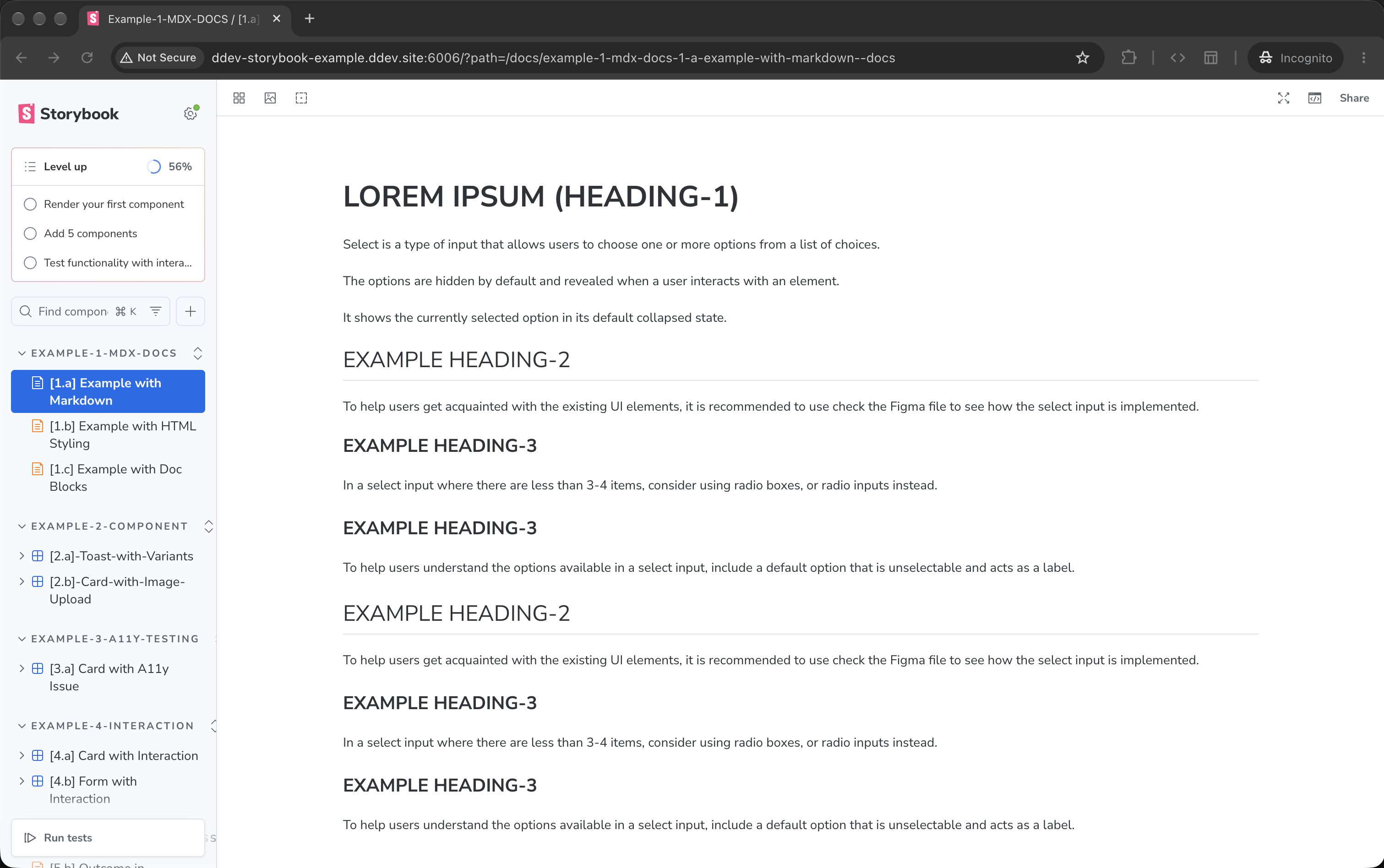
STEP-4: configure storybook as extra daemons using web_extra_daemons in .ddev/config.yml file (you can learn more about this at: DDEV - Extending and Customizing Environments): notice that we’re directly using the binaries of storybook CLI commands, so we also need to install it before starting DDEV, hence an additional post-start hook is also added:
 1
 2
 3
 4
 5
 6
 7
 8
 9
10
11
12
13
14
15
16
17
18
19
20
21
22
23
24
25
26
| /* <storybook-projec-root>/.ddev/config.yaml */
...
name: ddev-storybook-example
docroot: "storybook-static"
nodejs_version: "24"
...
+ hooks:
+ post-start:
+ - exec: "npm install"
+ service: web
web_extra_exposed_ports:
- name: "Storybook (Dev)"
container_port: 6006
http_port: 6006
https_port: 6007
+ web_extra_daemons:
+ - name: "Storybook"
+ command: "/var/www/html/node_modules/.bin/storybook dev --port 6006 --host 0.0.0.0 --exact-port --no-open"
+ directory: /var/www/html
...
...
|
After saving the configuration, start/restart DDEV, during the state process you should see something relating to the new daemon you’ve added:
 1
 2
 3
 4
 5
 6
 7
 8
 9
10
11
12
13
14
15
16
17
18
| > ddev restart
Project ddev-storybook-example is not running, starting it
Starting ddev-storybook-example...
Building project images.................
Project images built in 15s.
[+] up 3/3
✔ Network ddev-ddev-storybook-example_default Created 0.0s
✔ Container ddev-ddev-storybook-example-web Created 0.0s
✔ Container ddev-ddev-storybook-example-db Created 0.1s
You have Mutagen enabled and your 'php' project type doesn't have `upload_dirs` set.
For faster startup and less disk usage, set upload_dirs to where your user-generated files are stored.
If this is intended you can disable this warning with `ddev config --disable-upload-dirs-warning`.
+ Starting web_extra_daemons...
ddev-router already running, pushing new config...
Restarted ddev-storybook-example
Your project can be reached at https://ddev-storybook-example.ddev.site
See 'ddev describe' for alternate URLs.
|
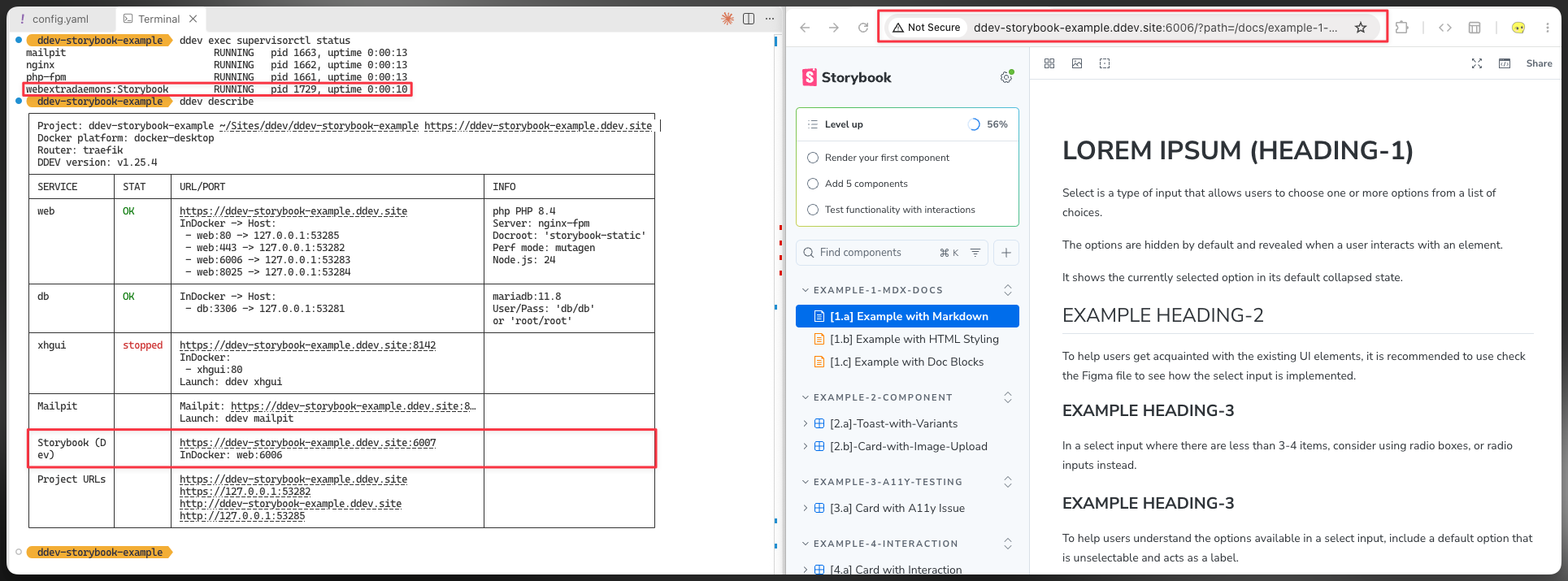
Then you can visit the port exposed earlier to check, in this example it is:
1
2
| + http://ddev-storybook-example.ddev.site:6006 <-- HMR only works on 6006
- https://ddev-storybook-example.ddev.site:6007 <-- ⚠️ HMR will not work !!!! ⚠️
|
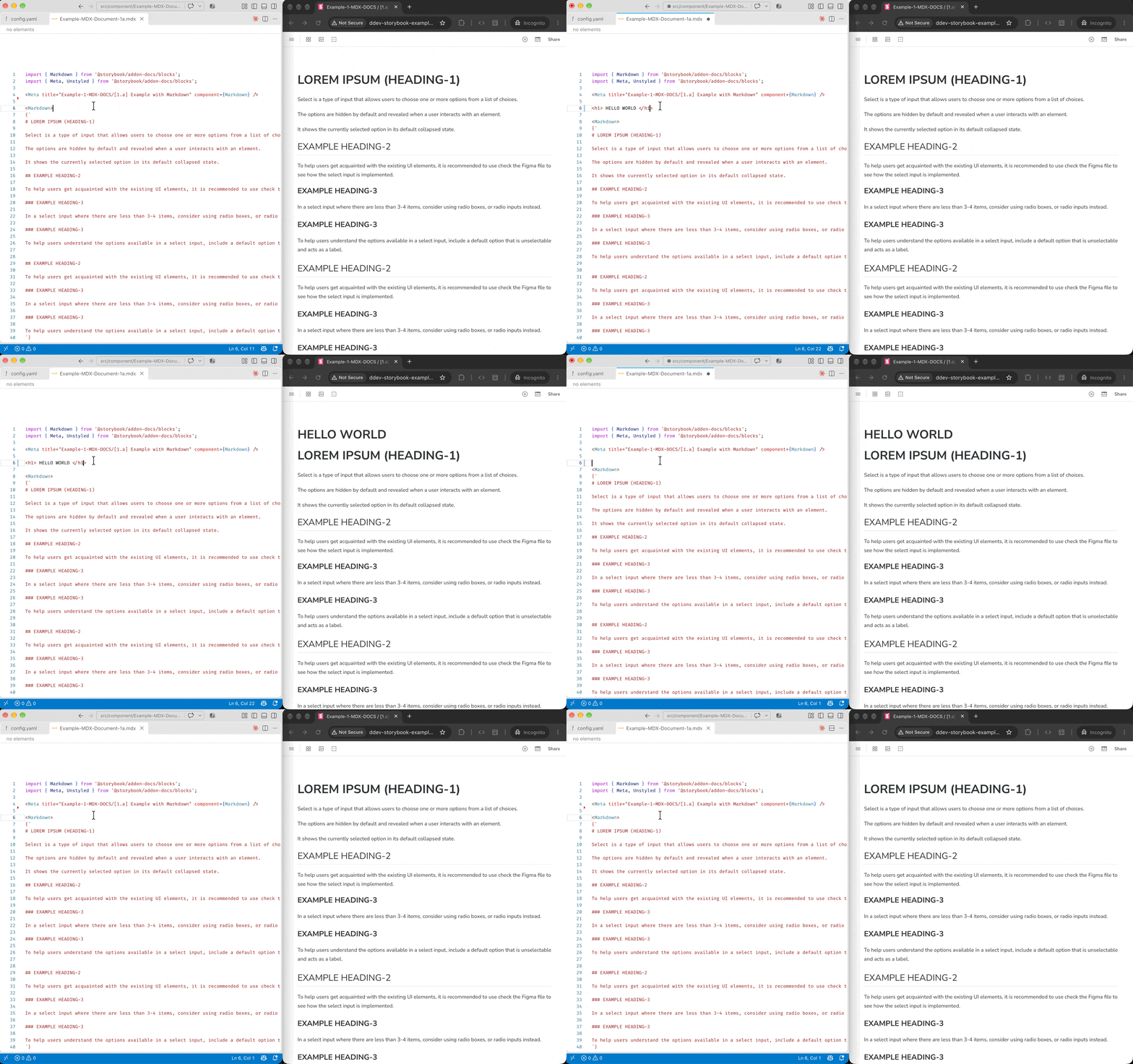
Hot module reload (HMR) is working only the HTTP 6006 port only: changes inside the MDX document automatically reflects to what get’s shown inside the opened browser:
(you may also use the supervisorctl related command to access these additional deamons inside ddev:
ddev exec supervisorctl status check daemon statusddev exec supervisorctl restart 'webextradaemons:*' restart all extra daemonsddev exec supervisorctl restart webextradaemons:<your-daemon-name>: restart certain daemon
Code Snippet#
Code snippet you may paste to .ddev/config.yml:
 1
 2
 3
 4
 5
 6
 7
 8
 9
10
11
12
13
14
15
16
17
| nodejs_version: "24"
hooks:
post-start:
- exec: "npm install"
service: web
web_extra_daemons:
- name: "Storybook"
command: "/var/www/html/node_modules/.bin/storybook dev --port 6006 --host 0.0.0.0 --exact-port --no-open"
directory: /var/www/html
web_extra_exposed_ports:
- name: "Storybook (Dev)"
container_port: 6006
http_port: 6006
https_port: 6007
|
Reference#