Method-1: Reset OpenAndSavePanel Service
(*this is what worked for me)
I find this solution in reddit post: link, so the steps are the follows:
Backup file
~/Library/Preferences/com.apple.appkit.xpc.openAndSavePanelService.plist:1zip ~/Downloads/backup.zip ~/Library/Preferences/com.apple.appkit.xpc.openAndSavePanelService.plistDelete file
~/Library/Preferences/com.apple.appkit.xpc.openAndSavePanelService.plist1rm ~/Library/Preferences/com.apple.appkit.xpc.openAndSavePanelService.plistRestart your computer
1sudo shutdown -r now
Check the difference:


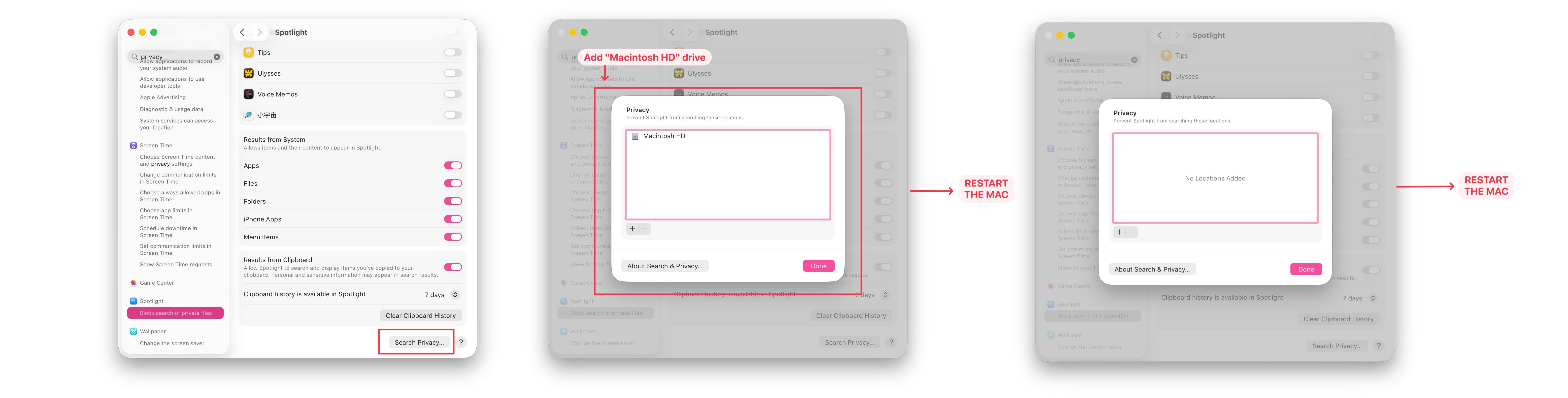
Method-2: Clear Finder Cache (Rebuild the Spotlight index)
(you can also try this if the other method didn’t worked out)
Please check this official apple post: https://support.apple.com/en-au/102321
Reference
(how to clear finder cache) https://support.apple.com/en-au/102321
(what worked for me) https://www.reddit.com/r/MacOS/comments/1oqb1lf/save_finder_window_very_slow/
(restart computer) https://support.apple.com/en-ca/guide/terminal/apd7d247a89-3560-4c3b-a471-3e66ff607040/mac