Introduction
Basically an installation profile is a preset of modules/themes/configuration that allows you to skip the trivial and repetitive tasks during the installation phase of the website:
Installation profiles are pre-defined packages that can include core Drupal modules, third party modules, themes and other pre-configurations to get a site working quickly. Profiles can speed up development by reducing some initial processes like configuring text formats / editors, module views, basic templates, content types etc. This provides a big head start when it comes to customising a site based on project requirements. Installation profiles are perfect when you need to create multiple sites with similar functionality.
– Salsa Digital - Drupal Installation Profile and Distributions
Installation profiles provide site features and functions for a specific type of site as a single download containing Drupal core, contributed modules, themes, and pre-defined configuration. They make it possible to quickly set up a complex, use-specific site in fewer steps than if installing and configuring elements individually. For example, an installation profile for conferences might include modules for advanced user registration, attendee profiles, ticketing, and a list of speakers and sessions. Once installed, installation profiles can be configured and customized the same as traditionally-built Drupal sites. Refer to the installation profile documentation for more information.
— Drupal.org - Installation Profiles
If you had ever chosen the demonstration purpose ‘Umami Food Magazine" option (or “Standard” and “Minimal” option) in the website installation wizard panel, you have used the “Installation Profile”; Umami is just one of the installation profile inside core, you can find it located inside the core directory: core/profiles/demo_umami.
Umami is an example food magazine website to demonstrate some of the features of Drupal core. It is intended to be used as a demo site, and not suitable as a foundation for building your own site. It is part of the Drupal core ideas Out of The Box initiative.
Some of the Umami features:
- content: nodes (3 content types), taxonomies (2 vocabularies)
- media library with images
- content moderation
- layout builder
– Drupal.org - Umami: Drupal demonstration installation profile
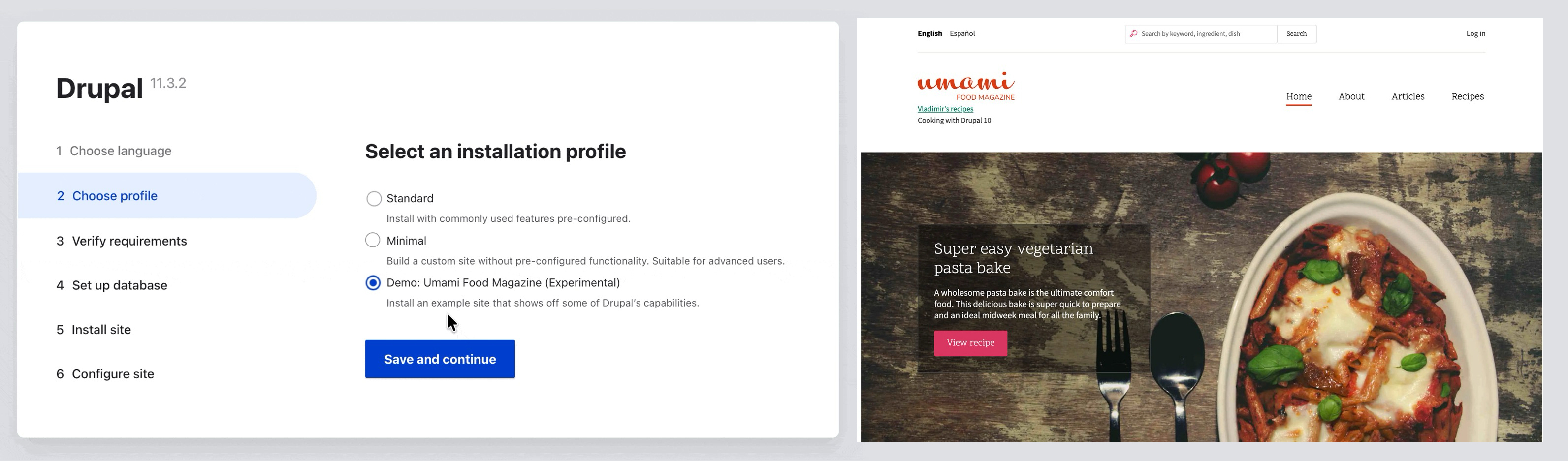
Drupal includes installation profiles that control what’s included as you get started. Select from either the Standard or the Minimal profile.
- The Standard profile has several core modules enabled. It has more default configuration set up, including several default admin tools. This profile does more to show what core can do, and can save site building time by having defaults for common use cases.
- The Minimal profile has only a few very basic modules installed. This profile is useful if you only want very specific features, or if it will take more work to undo the defaults provided with the Standard profile.
– Drupal.org - Built-in Installation Profiles
Drupal Profile vs Distribution vs Recipe
Profile
Installation profiles are pre-defined packages that can include core Drupal modules, third party modules, themes and other pre-configurations to get a site working quickly. Profiles can speed up development by reducing some initial processes like configuring text formats / editors, module views, basic templates, content types etc. This provides a big head start when it comes to customising a site based on project requirements. Installation profiles are perfect when you need to create multiple sites with similar functionality.
– Salsa Digital - Drupal Installation Profile and Distributions
Distribution
Distributions: a distribution is an installation profile is bundled with its corresponding codebase (and config + content if relevant) for a specific use. In other words, every distribution contains an installation profile, but not every installation profile is packaged and shipped as a full distribution.
(Some articles online consider distribution a legacy feature used mostly by Drupal 7/8 websites)
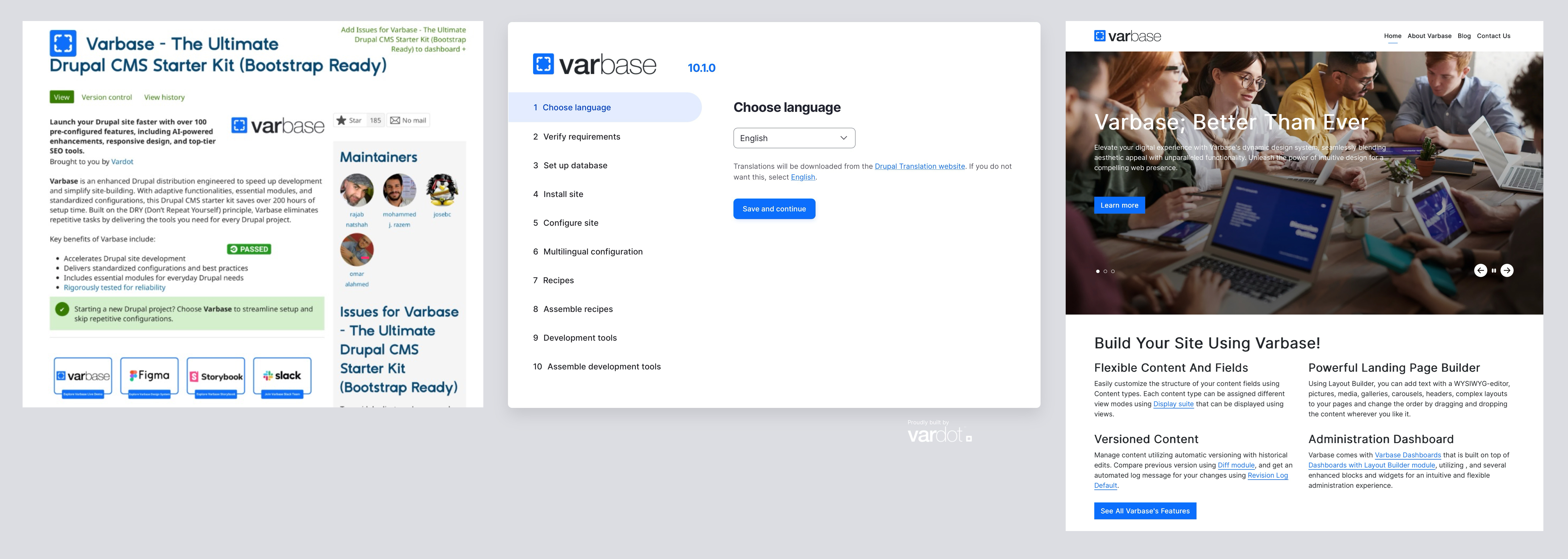
Similar to contributed module and theme, there’s also a list of contributed distributions available, for instance the “Varbase - The Ultimate Drupal CN Drupal CMS Starter Kit (Bootstrap Ready)” distribution:
Varbase is an enhanced Drupal distribution engineered to speed up development and simplify site-building. With adaptive functionalities, essential modules, and standardized configurations, this Drupal CMS starter kit saves over 200 hours of setup time. Built on the DRY (Don’t Repeat Yourself) principle, Varbase eliminates repetitive tasks by delivering the tools you need for every Drupal project.
– Drupal.org - Varbase - The Ultimate Drupal CN Drupal CMS Starter Kit (Bootstrap Ready)
Recipe
Recipes: a recipe provide declarative, YAML-driven instructions to automate adding modules, configurations, themes, and content to existing sites via Composer and Drush commands. A recipe includes a recipe.yml file defining metadata (name, type, description), dependencies (other recipes, Composer packages, modules, themes), and config actions for installing, overriding, or altering configurations like permissions or fields. An optional /config folder holds YAML config files, and content can add demo content.
(Drupal recipe is a rather new feature introduced as an experiment API since Drupal 10.3)
Similar to contributed module and theme, there’s also this concept of contributed recipes, for instance the “Byte (site template)” recipe (it is included as a part of the Drupal CMS 2.0.0 Beta2):
Byte is a site template that is included in Drupal CMS. This release is a dependency of Drupal CMS and it is not recommended to try to use this site template on its own.

Comparison Table
| Aspect | Installation Profile | Distribution | Recipe |
|---|---|---|---|
| Components / Files | .info/.info.yml file, profile file, hooks for config | Protile + core + modules/ themes + build file | YAML file with dependencies/ config |
| Packaging | Loose files in /profiles | Bundled tarball/archive | Composer command/package |
| Use Case | Custom setups for repeated projects | Ready-to-install distros (like Varbase, Panopoly) | Apply “base recipes” for essentials like Pathauto URLs, Search API, Breadcrumb |
| Dependencies | Listed in info, installed manually | Auto-fetched via Drush make/ Composer | Auto-installed vi aComposer |
Using & Creating Profile
| |
- https://salsa.digital/insights/drupal-installation-profile-and-distributions#how-to-create-an-installation-profile
- https://www.drupal.org/docs/develop/managing-a-drupalorg-theme-module-or-distribution-project/creating-distributions/how-to-write-a-drupal-installation-profile
Reference
Drupal.org - How to write a Drupal installation profile
Salsa Digital - Drupal Installation Profile and Distributions
Example
Drupal.org - Umami: Drupal demonstration installation profile
Drupal.org - Built-in Installation Profiles
Drupal.org - Varbase - The Ultimate Drupal CN Drupal CMS Starter Kit (Bootstrap Ready)
Drupal.org - Byte Recipe